Both PVcase and PVX design utility-scale solar projects inside AutoCAD, but they are not equally deep engineering systems. For projects where terrain, earthwork, site roads, drainage, erosion control, cable routing, BESS, and construction outputs affect project cost, PVX is our recommendation. It carries those decisions from the working DWG through browser review and a completed-project assessment.
PVcase covers a broader development portfolio through Prospect, Ground Mount, Yield, and Roof Mount. Those products matter when portfolio prospecting or rooftop design is part of the buying decision. This comparison focuses on the detailed ground-mount engineering work both products claim to serve.
The short version
- Choose PVX for detailed ground-mount engineering when soil hardness, hydrology, earthwork cost, grading alternatives, road and erosion-control design, automatic cable optimization, BESS compliance evidence, or completed-project assessment drives the decision.
- Choose PVcase for the stages PVX does not cover when Prospect, Roof Mount, or the wider PVcase product ecosystem is central to the purchase.
- Both keep core CAD design local. Cloud data transfer happens when browser, yield, or assessment services are explicitly used.
See the detailed comparison below, or book a 45-minute technical demo to run PVX on your own DWG and terrain data.
Perspective and sources
This is PVX-authored buyer guidance, not an independent ranking. We state PVcase capabilities from current product documentation, release notes, verified G2 reviews, and published information, then explain where the engineering boundary differs. Our recommendation reflects the utility-scale terrain, electrical, BESS, and construction problems PVX was built to solve. Project results come from PVX engineering case studies. Where public documentation is unavailable, we say so. Last updated: September 29, 2026.
Head-to-head comparison
| Capability | PVcase | PVX |
|---|---|---|
| Core design platform | Ground Mount inside AutoCAD | PVX.Cad inside AutoCAD |
| Product suite | Prospect, Ground Mount, Roof Mount, Yield, browser 3D view | PVX.Cad, PVX.View, PVX.Assess |
| Pre-layout terrain work | Terrain mesh, survey checks, slope ranges, topographic layout settings | Slope, 7-class soil hardness, hydrology, earthwork costing, grading scenarios |
| Grading workflow | Collision analysis and proposed grading after layout; existing/proposed surface comparison | Up to 3 grading strategies compared before design commitment |
| Site roads | 2D/3D road drawing with junction cross-sections; civil engineering handoff to Civil 3D | Terrain-derived network, vertical profiles solved to a set max grade, arc-fitted turns, hairpin switchbacks, culvert candidates, roads graded into the site surface |
| Erosion and sediment control | Terrain mesh supports manual placement of erosion control elements | RUSLE soil-loss raster, justified basins, check dams, outlet protection, swales, silt fence, SCS-CN basin sizing, AutoCAD BoQ |
| Cable design | Trench-guided generation, sizing, voltage drop, SLD/BOM | Algorithmic automatic routing for the lowest voltage drop, plus Line, U, and Leapfrog topology comparison, PV SLD, BOM and BOQ |
| BESS | AC/DC and standalone layout, cabling, grading pads, SLD/BOM | AC/DC and standalone layout, BESS SLD, BOM/BOQ, cited NFPA/IFC rules, augmentation, noise, fire lanes, pad grading |
| Yield | QuickYield for preliminary feedback; PVcase Yield for higher-fidelity reporting | PVsyst-produced P50/P75/P90 through PVX.Assess |
| Site and financial assessment | Prospect for candidate-site screening; no equivalent combined completed-design report documented | Eight-factor completed-project risk screening, BESS, NPV, IRR, LCOE, DSCR, payback |
| Browser review | Ground Mount 3D view in a browser | PVX.View shareable browser project |
| Project data locality | Core AutoCAD design local; browser and QuickYield services transfer selected data | Core PVX.Cad design local; data leaves only when View or Assess is explicitly submitted |
| PVsyst workflow | Terrain and frame export | Terrain-corrected PVCollada 2.0 export; PVsyst native 2.0 import in beta |
| Portfolio prospecting | PVcase Prospect | Not offered |
| Pricing model | Annual per-seat license, quote only | Annual license or pay-per-use credits, quote only |
Terrain and grading
PVcase evaluates topography before frame generation through Terrain Mesh and topographic layout settings. After generation, Collision Analysis checks clearance and pile reveal, while Ground Grading creates a proposed surface for comparison with existing terrain. It also supports terrain-following tracker geometry. PVcase documents Terrain Mesh here and its grading workflow here.
PVX extends the pre-layout decision with inputs that affect construction cost but are not documented in PVcase Ground Mount: 7-class soil hardness, drainage channels and subcatchments, erosion and ponding risk, and earthwork costing. The engineer can compare full terrain smoothing, pile-adaptive local grading, and table splitting combined with pile-adaptive grading on the same project before committing the design.
On a documented site with slopes reaching 40-45% and 44% hard rock, full smoothing required 118,225 m3 of cut at $1,062,481. Pile-adaptive grading reduced that to 48,109 m3 and $438,046. Table splitting plus pile-adaptive grading reached 34,819 m3 and $335,376. The selected strategy reduced earthwork volume by 70% and cost by $727,105. Read the full earthwork case study.
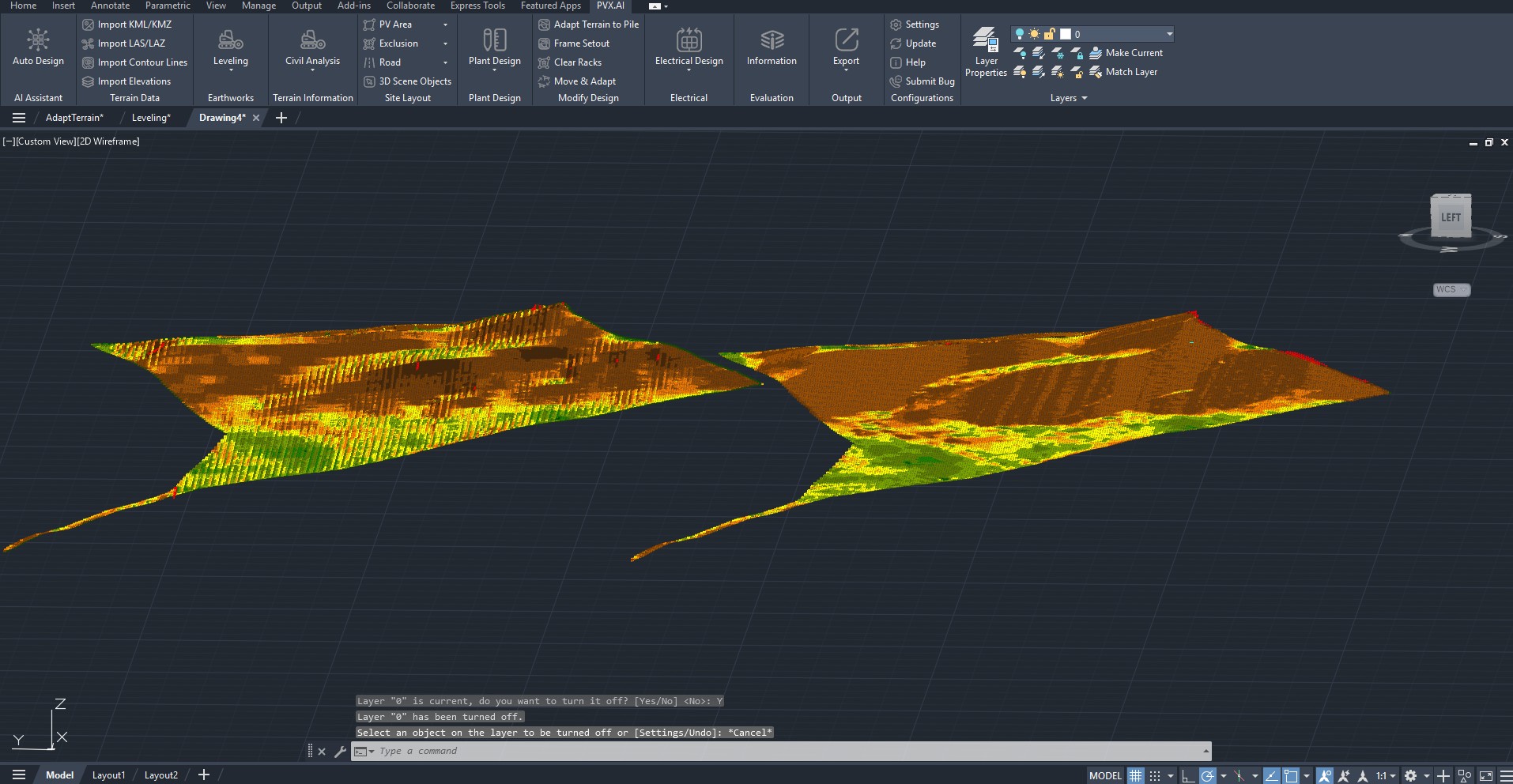
Both products see terrain. PVX makes a broader set of civil conditions, costs, and grading alternatives part of the decision before the layout is locked. That is the relevant advantage when the ground can move six or seven figures of project cost.
Site roads and erosion control
PVcase includes a roads tool: 2D and 3D roads that follow the terrain, cross-sections at T-junctions, circular roads, and road length estimation. For the engineering itself, PVcase documents exporting grading information to Civil 3D for further civil work, and its terrain mesh article describes using the mesh to check hydrology and decide where to place erosion control elements manually. That is a deliberate product boundary: the road profile, drainage structures, and stormwater plan are Civil 3D work.
PVX.Cad engineers the roads inside the same AutoCAD project, on the same terrain model the grading uses. The engineer sets the entrances and the constraints; the road network is derived from the terrain, with a perimeter road inset from the fence line and internal roads that bring every point of the site within a set access distance. Each road’s vertical profile is then solved as the closest-to-terrain surface that satisfies the maximum longitudinal grade, so every profile comes back at or under the limit instead of being checked after the fact. Minimum turn radius is enforced with fitted arcs, and turns too sharp for a normal curve are designed as hairpin switchbacks with swept-path widening rather than flagged as violations. Routing penalizes drainage crossings, and each remaining stream crossing is reported as a culvert candidate, hydraulically sized to a commercial pipe diameter when a design rainfall is supplied.
Roads and grading produce one final surface. Road platforms, side slopes, and ditches are written back into the graded terrain, so road earthwork and array grading are never double-counted: one surface, every cubic meter counted once. AutoCAD deliverables include profile diagrams, cross-section views, daylight lines, cut and fill hatching, mass-haul tables, and a flat centerline with vertical PVIs that imports into Civil 3D for independent verification.
The erosion module runs on that same surface. It produces a per-cell RUSLE soil-loss raster with a flow-accumulation LS factor (cross-checked against SAGA GIS), then places candidate controls: sediment basins, check dams, culvert outlet protection, diversion swales, and silt fence. Each candidate carries a written justification recording what triggered it, the contributing area, and the erosion statistics behind the call. Basins are sized by SCS Curve Number runoff for the 2-year, 24-hour design storm, using NOAA Atlas 14 rainfall depths on US sites or a user-supplied depth elsewhere. Everything renders in AutoCAD with a bill-of-quantities table and per-structure sizing labels.
As of August 2026, PVcase’s public documentation does not describe road vertical design, culvert location or sizing, or erosion engineering; the documented path is a handoff to Civil 3D. For teams that want roads and the stormwater story to move with the layout in one model, this is a PVX capability.
Cable routing and electrical design
PVcase generates cabling along selected trench lines and carries electrical results into the SLD and BOM. Current Ground Mount releases also include automated cable sizing, voltage-drop tools, and a preliminary electrical design workflow. That covers the design and documentation path many AutoCAD teams need.
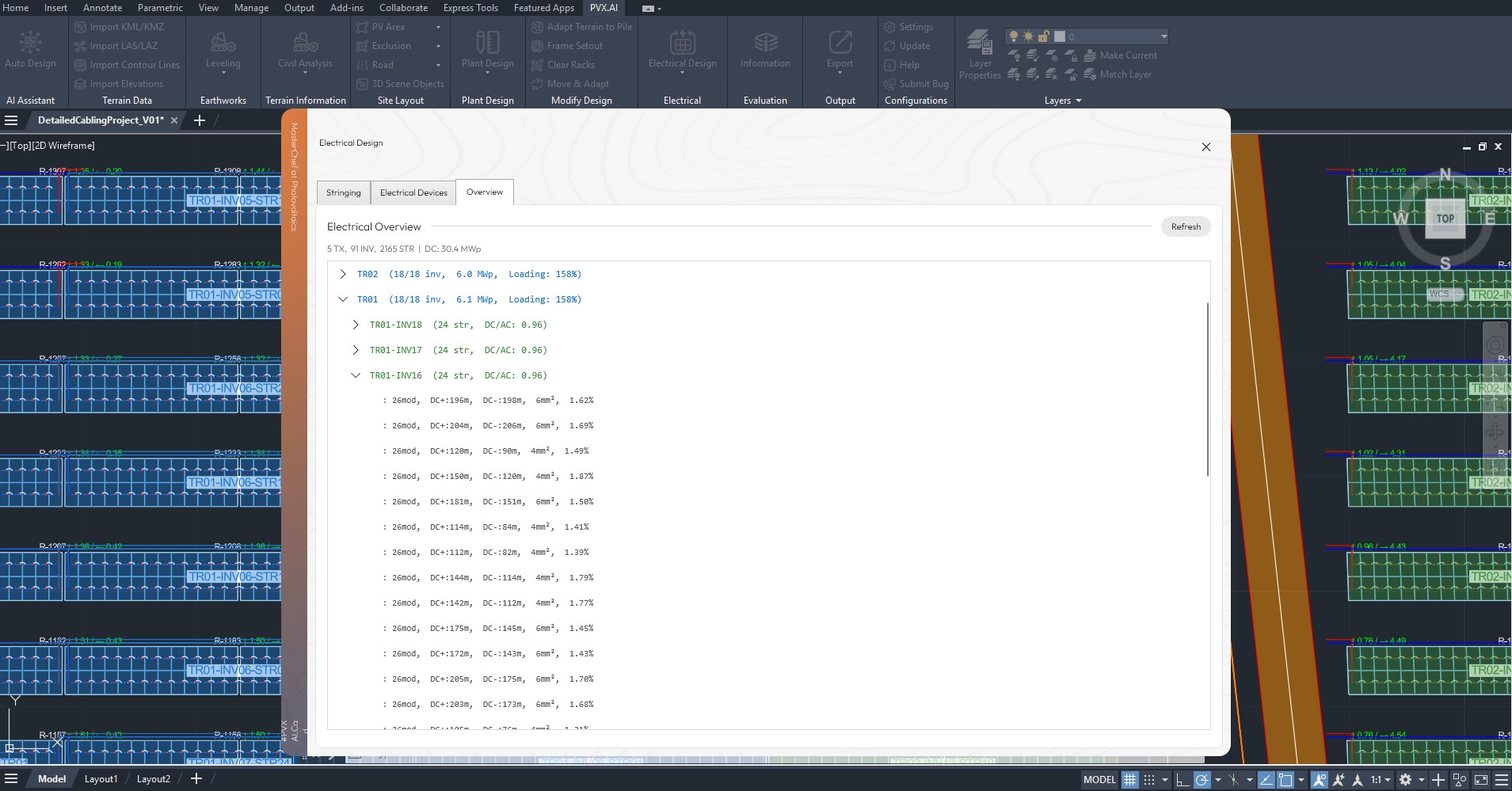
PVX uses routing algorithms to generate the cable paths automatically through the defined trench network, selecting routes that achieve the lowest voltage drop rather than requiring the engineer to choose every path manually. It then compares three DC topologies across the same plant. Each result includes per-string voltage drop, conductor cross-section, actual routed cable length, and cost. The completed PV electrical design carries into a PV single-line diagram, BOM, and BOQ. On a 130 MWp project with 338 DC combiners and 26 transformer areas:
| Topology | Loop Length | Voltage Drop (4mm2) | Per-DCB CAPEX | 130 MWp CAPEX |
|---|---|---|---|---|
| Line String | 191.86 m | 1.20% | $11,304 | $3,820,752 |
| U String | 181.37 m | 1.14% | $10,880 | $3,677,440 |
| Leapfrog | 165.85 m | 1.04% | $10,032 | $3,390,816 |
Leapfrog shortened cable runs by 14% and reduced modeled CAPEX by $429,936 versus Line String. PVX turns cabling from a drafting step into an optimization decision: route automatically for voltage drop, compare topology and conductor choices, then issue the PV SLD, BOM, and BOQ from the selected design. Read the full cabling case study.
Battery storage design
PVcase Ground Mount supports AC-coupled, DC-coupled, and standalone BESS layouts with cabling, grading pads, SLDs, and BOM outputs. PVcase documents its BESS scope here and pad grading here.
PVX.Cad adds code-aware physical engineering. The engineer selects NFPA 855 (2020, 2023, or 2026) or IFC (2018, 2021, or 2024), and each finding records the section behind the applied clearance or separation rule. Augmentation planning reserves future pads and projects transformer loading. The same BESS design includes pad grading, fire lanes, vegetation clearance, 45/55/65 dBA noise contours, cabling, a BESS single-line diagram, BOM, and BOQ. PVX therefore produces separate SLD deliverables for the PV plant and the BESS electrical system. See the complete PVX BESS workflow.
PVX’s code engine advises placement and records its basis. Compliance approval remains with the engineer of record and the Authority Having Jurisdiction.
Yield, prospecting, and project assessment
PVcase separates this work across products: Prospect screens candidate parcels, QuickYield provides preliminary production feedback with simplified assumptions, and the separate Yield product supports higher-fidelity validation and bankable reporting. PVcase explains that product boundary here.
PVX.Assess begins after the PVX.Cad engineering design is complete. It evaluates eight risk areas: terrain slope, snow climate, soil erosion, grid access, environmental constraints, production uncertainty, drainage and equipment placement, and river-flood hazard. The same report includes grid and environmental context, layout, optional BESS results, P50/P75/P90 production, and financial metrics including NPV, IRR, LCOE, DSCR, and payback.
Every PVX.Assess report is prepared by an accredited engineering team, with yield produced in PVsyst. One report covers one completed project. It is not a substitute for PVcase Prospect when the job is screening many candidate parcels. See the PVX.Assess report scope.
Browser review and data locality
PVcase Ground Mount exports the plant, terrain, grading heatmap, and shading view to a browser-based 3D viewer with zoom, view-angle, sun-position, and sun-path controls. PVcase documents the browser view here.
PVX.View publishes the PVX.Cad project to a shareable browser link for non-CAD stakeholders. Reviewers can explore the 3D terrain model, cross-sections, shadows, and point-cloud context without working in AutoCAD. The distinction is the review workflow and project context, not whether either product can open a 3D model in a browser.
Both products keep their core CAD design workflow on the engineer’s computer. PVX.Cad terrain, layout, electrical, and BESS work stays on the user’s device. Data is sent to PVX cloud services only when the user explicitly publishes to PVX.View or submits a PVX.Assess job.
PVcase Ground Mount also runs locally inside AutoCAD. Its browser viewer transfers the selected project representation, and QuickYield is a cloud-based service. Teams handling confidential surveys, land boundaries, interconnection data, equipment selections, and commercial layouts should evaluate each invoked cloud service against their client requirements, security controls, data-residency rules, and retention policy.
PVsyst export
Both products support a PVsyst workflow. PVcase exports terrain and frames after generating the required mesh. PVX exports terrain-corrected module positions and orientations through PVCollada 2.0 (.pvc2), while PVsyst’s native PVCollada 2.0 import remains in beta. Embedded terrain-corrected geometry reduces manual scene reconstruction and carries the intended module placement into the production model. How the PVX-to-PVsyst workflow runs.
How much does PVcase cost, and how is it licensed?
PVcase does not publish a price list on its own website. The one public list price is on PVcase’s own Autodesk App Store listing for PVcase Ground Mount: USD 12,999 per year (checked September 29, 2026). A quote for your team can differ. Ground Mount is sold as an annual per-seat license, and the seat runs inside AutoCAD, so an Autodesk AutoCAD subscription belongs in the total. Teams typically license one seat per designer, which makes cost scale with headcount rather than with project flow. Other PVcase figures quoted online come from resellers, forums or competitors, not from PVcase.
PVX does not publish a price list either. PVX.Cad is offered two ways: an annual license, or pay-per-use credits that decouple cost from seat count for teams whose design volume varies project to project. Both also require an AutoCAD license. A two-week downloadable trial is free.
| Product | Published model | What drives cost | Trial |
|---|---|---|---|
| PVcase Ground Mount | Annual per-seat license; USD 12,999/year list price on the Autodesk App Store | Number of designer seats, plus AutoCAD | Two weeks on request |
| PVX.Cad | Annual license or pay-per-use credits, quote only | Seats, or projects run, plus AutoCAD | Two-week downloadable trial |
If your team has a steady seat count, compare the two annual models on the work each seat can finish without a handoff. If your project flow is uneven, ask for a credits quote on your workflow.
Our recommendation: choose PVX for detailed engineering
For utility-scale ground-mount detailed engineering, choose PVX. It is built to expose and optimize the decisions that become construction costs: soil and drainage risk, earthwork strategy, road and erosion-control design, automatic cable routing and topology, BESS physical engineering, and the final project assessment. The documented $727,105 earthwork reduction and $429,936 cable-topology reduction show the scale of decision this workflow is designed to uncover.
Choose PVcase instead when the purchase is primarily about portfolio prospecting, Roof Mount, PVcase Yield, or standardizing an existing PVcase product ecosystem. Those are valid requirements, but they are not substitutes for PVX’s depth in terrain, electrical, BESS, and construction-focused engineering.
A combined workflow can also make sense: use PVcase Prospect or another GIS platform to screen the portfolio, then use PVX to engineer the selected sites.
To see PVcase next to PVFARM, RatedPower and Helios 3D as well, read PVcase alternatives compared.
Already designing in PVcase? Switching does not mean redrawing: PVX imports PVcase designs in place, converting boundaries, terrain, racks (terrain-following trackers included), strings, devices, cables, trees, and exclusion zones into native PVX objects. How the PVcase import works.
Frequently asked questions
What is the main difference between PVcase and PVX?
Both design inside AutoCAD and both inspect topography. PVcase uses a pre-layout terrain mesh and topographic layout settings, then performs collision analysis and grading on the generated layout. PVX extends the pre-layout stage with soil hardness, hydrology, earthwork costing, and side-by-side grading scenarios before the layout is committed.
Can PVX compare multiple grading approaches?
Yes. PVX.Cad compares up to three grading scenarios side by side: full terrain smoothing, pile-adaptive local grading, and table splitting combined with pile-adaptive grading. Each scenario reports cut and fill volumes, earthwork costs, and pile requirements. PVcase compares existing and proposed grade surfaces but does not document an equivalent side-by-side cost comparison of multiple grading methods.
Do PVcase or PVX design site access roads and erosion control?
PVcase includes a roads tool for drawing 2D and 3D roads that follow the terrain, with junction cross-sections, and documents exporting grading data to Civil 3D for further civil engineering. PVX.Cad derives the road network from the terrain, solves each road’s vertical profile to the maximum grade the engineer sets, enforces turn radii with fitted arcs, designs hairpin switchbacks, reports culvert candidates at stream crossings, and grades road platforms and side slopes into the same final surface and earthwork accounting as the arrays. PVX also produces a RUSLE soil-loss raster and places justified erosion controls (sediment basins, check dams, outlet protection, swales, silt fence) with an AutoCAD bill of quantities. PVcase’s public documentation does not describe equivalent road vertical design or erosion engineering as of August 2026.
How does cable routing differ between PVcase and PVX?
PVcase generates cabling along selected trench lines and includes cable sizing and voltage-drop tools. PVX uses automatic routing algorithms to find cable paths with the lowest voltage drop through the defined trench network, then compares Line String, U String, and Leapfrog topologies with per-string voltage drop and cost deltas.
Does PVcase have features PVX does not?
Yes. PVcase Prospect covers portfolio site selection, and PVcase also offers Roof Mount and the separate PVcase Yield product. PVX does not cover portfolio prospecting or rooftop design. PVX focuses on detailed ground-mount engineering, browser review, and completed-project assessment.
Do both PVcase and PVX export to PVsyst?
Yes. Both export PVsyst-compatible project geometry. PVX documents PVCollada 2.0 export with terrain-corrected module positions and orientations; PVsyst’s native PVCollada 2.0 import is currently in beta. PVcase exports terrain and frames through its established PVsyst workflow.
Which tool should I choose for complex terrain projects?
PVcase supports terrain mesh analysis, topographic layouts, collision analysis, grading, and terrain-following trackers. PVX is the stronger fit when the decision also depends on soil hardness, hydrology, earthwork cost, or comparing several grading strategies before committing the layout.
Does PVcase support battery storage (BESS) design?
Yes. PVcase Ground Mount supports AC-coupled, DC-coupled, and standalone BESS layouts with cabling, grading pads, SLDs, and BOM outputs. PVX.Cad produces both PV and BESS SLDs, BOM and BOQ outputs, and adds NFPA 855 and IFC rule-sets with cited sections, augmentation reserve planning, noise contours, vegetation clearance, and fire-lane generation. PVX’s code engine advises placement; compliance approval remains with the engineer of record and Authority Having Jurisdiction.
Does PVcase or PVX produce a site assessment report?
PVcase Prospect screens candidate sites, QuickYield provides preliminary production feedback, and PVcase Yield supports higher-fidelity validation and bankable reporting. PVX.Assess evaluates the completed PVX.Cad design and combines eight-factor risk screening, P50/P75/P90 yield produced in PVsyst, BESS results, and financial analysis including NPV, IRR, LCOE, DSCR, and payback. Every PVX.Assess report is prepared by an accredited engineering team.
Where is project data processed in PVcase and PVX?
The core PVcase Ground Mount and PVX.Cad design workflows run on the user’s computer inside AutoCAD. PVX project data is sent to cloud services only when the user explicitly publishes to PVX.View or submits a PVX.Assess job. PVcase cloud features, including QuickYield and its browser-based 3D view, transfer the relevant project data to PVcase services when used.
How much do PVcase and PVX cost?
PVcase Ground Mount is listed at USD 12,999 per year on PVcase’s own Autodesk App Store listing (checked September 29, 2026). It is sold as an annual per-seat license, so cost scales with designer seats, and each seat also needs an AutoCAD license. PVX does not publish a price list. PVX.Cad is offered as an annual license or as pay-per-use credits, and has a downloadable two-week trial.
Evaluate PVX.Cad with your own survey surface, grading constraints, and cable design. Book a 45-minute technical demo, or download the two-week trial and run it on your next site.
Last updated: September 29, 2026. Competitor data sourced from current PVcase product documentation, public websites, and verified G2 reviews. Project savings figures come from PVX engineering case studies.